

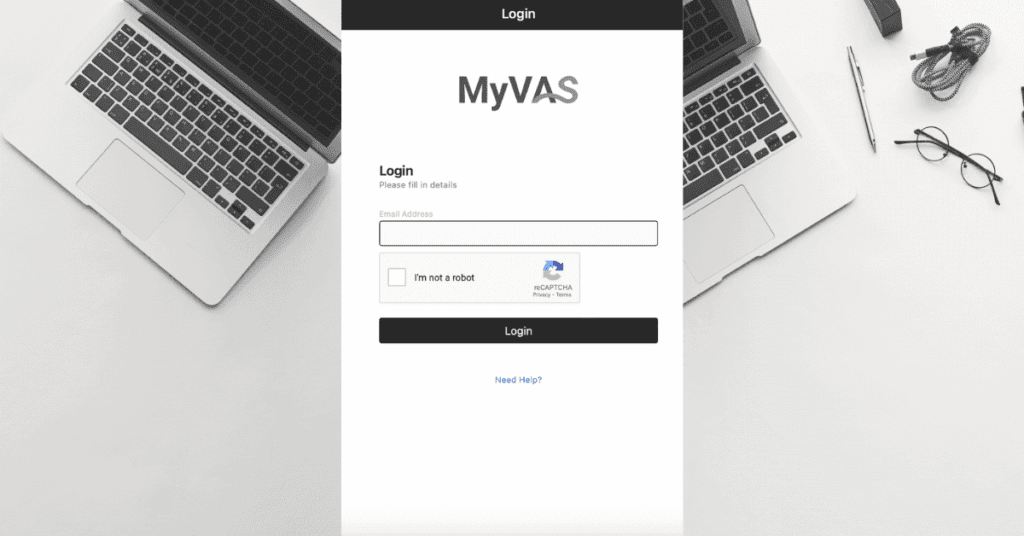
To login MyVAS, go to https://myvas.moh.gov.my. The address redirects to the health facility check-in app at myvas.moh.gov.my/checkin/healthFacility and then to the sign-in page at identity.myvas.moh.gov.my, where you click Login With MyDigital ID or type your registered personal email address and password. MyVAS, short for Malaysia's Virtualhealth Assistant System, is the Ministry of Health Malaysia (Kementerian Kesihatan Malaysia, KKM) system that health facility staff use for immunisation, vaccination, appointment and health screening records. Searchers often type it as MyVASS, my vas or MyVAS KKM; all three mean this one portal.
Members of the public cannot log in to MyVAS. Your own vaccination record and clinic appointments are in the MySejahtera app, which displays the data that facilities enter in MyVAS. For account problems, open a ticket at helpdesk.myvas.moh.gov.my or email myvashelpdesk@mysejahtera.org.
How to Login MyVAS at myvas.moh.gov.my
To log in to MyVAS in 2026, follow these 6 steps:
- Open https://myvas.moh.gov.my in a browser. The site redirects to /myvas and then to the check-in app at /checkin/healthFacility.
- Wait for the sign-in page at identity.myvas.moh.gov.my. It is titled "MyVAS Login" and reads "Verify your identity securely using MyDigital ID to proceed."
- Click Login With MyDigital ID and approve the request in your MyDigital ID app. To use the older method, type your registered personal email address in the field under "Or".
- Enter your password on the next screen (email login only), and tick "I'm not a robot" if the box appears.
- Key in the SMS OTP sent to the mobile number on your account when MyVAS asks for it. The code expires after 5 minutes; "Resend OTP" sends a fresh one.
- Done. The language toggle switches the interface between English and Malay.
Is MyDigital ID Compulsory for MyVAS, and From When?
Yes. KKM has announced MyDigital ID as the sole login method for MyVAS, with two effective dates in its own channels. The helpdesk article "Implementation of MyDigital ID as the Sole Login Method for MyVAS", last updated 22 June 2026, and its Bahasa Melayu infographic ("Berkuat kuasa 1 Ogos 2026") give 1 August 2026. The banner on the helpdesk home page and the notice on the myvas.moh.gov.my/checkin page give 1 July 2026. On 26 August 2026 the identity page still showed the email field under the MyDigital ID button, so email login had not been switched off yet. Do not count on it staying.
The KKM infographic lists 3 preparation steps. Register a MyDigital ID certificate through the MyDigital ID login at digital-id.my. Open My Profile in MyVAS and confirm the IC number recorded there matches your MyKad, because MyDigital ID identifies you by IC number. Email myvashelpdesk@mysejahtera.org if the IC number is wrong, since profile corrections are not self-service.
What to Do If I Cannot Login to MyVAS or Forgot My Password?
Try an incognito or private browser window first, then clear the browser cache and try again. That is the fix in the helpdesk FAQ "I am unable to login to my health facility", which adds: if the issue persists, contact the admin team. Your Health Facility Admin can check whether the account is active and whether the email and phone number on it are correct.
There is no Forgot Password link on the MyVAS identity page. The first screen shows only the MyDigital ID button, the email field and a "Contact Help Centre" link, which opens the new-ticket form at helpdesk.myvas.moh.gov.my. A lost password is handled by ticket or by your Health Facility Admin; state your registered email and facility name in the request. Once MyDigital ID is the only login, the password no longer applies, because the MyDigital ID app approves each sign-in.
What Is MyVAS?
MyVAS is Malaysia's Virtualhealth Assistant System, a web platform owned by the Digital Health Division (Bahagian Kesihatan Digital) of the Ministry of Health Malaysia. Health facilities use it to record immunisation and vaccination, open appointment slots and capture health screening results, and MySejahtera shows that data to the patient. The expansion comes from the official MyVAS User and Health Facility Management Module User Guide; the "vaccine administration" expansion printed in some third-party guides is not the official name.
The 2023 helpdesk guide states that MyVAS has been used by more than 12,000 public and private health facilities since the start of the pandemic; the October 2024 edition of the same manual states more than 6,000. Both figures cover government Klinik Kesihatan, hospitals, private clinics and the former vaccination centres (PPVs). Access is limited to authorised staff, mainly Health Facility Admins and Health Officers.
Is MyVAS KKM or MyVASS the Same System?
Yes. KKM is Kementerian Kesihatan Malaysia, so "MyVAS KKM" names the owner of the same portal at myvas.moh.gov.my; there is no separate MyVAS KKM website. "MyVASS", "my vass" and "my vas" are misspellings of the same name. The moh.gov.my domain confirms the operator is the Ministry, not a vendor. Do not confuse it with myVAS from Müller-BBM, a German acoustics product with an unrelated login. MyVAS is one of the KKM services listed in the logmasuk Login Portal directory.
Is There a MyVAS App?
No. MyVAS has no mobile app on Google Play or the App Store, so a search for "MyVAS login KKM app" leads back to the web portal at myvas.moh.gov.my. The app side of the system is MySejahtera: the appointment slots, vaccination entries and screening results that staff record in MyVAS appear in the patient's MySejahtera account, including a virtual appointment card for a booked slot.
Who Can Log In to MyVAS, and How Do I Get an Account?
Two roles log in to MyVAS: the Health Facility Admin (HFA), who governs every account at the facility, and the Health Officer, who does the clinical entry. According to the helpdesk FAQ on shared accounts, the HFA creates each account and every user receives unique credentials. Since 20 March 2023 each officer must hold a personal credential; a shared facility login is not permitted.
Three rules apply to the credential, per the helpdesk FAQ on facility email addresses. The login email must be a personal email address, not the facility's. Each user is tied to one unique email, one phone number and one IC or passport number. Changes to that email or phone number are requested by writing to myvashelpdesk@mysejahtera.org, not from inside the portal. There is no public registration form, so "MyVAS registration" means being invited by your HFA.
How Do I Activate a New MyVAS Account?
Activation starts with the invitation email that the HFA triggers. The October 2024 User and Health Facility Management manual (tinyurl.com/MANUALHFA) sets out the sequence:
- Open the "Link to account update" in the invitation email.
- Enter the login email address and the temporary password from the email.
- Set a new password of at least 8 characters with 1 uppercase letter, 1 number and 1 special character.
- Click "Back to Application", enter the email, tick "I'm not a robot", then enter the new password.
- Key in your mobile number and the SMS OTP. The OTP expires in 5 minutes; "Resend OTP" issues a new one.
Only one phone number can be registered per user, and one person cannot hold two accounts, because the IC, email and contact number must each be unique in the system.
What Is the Function of the MyVAS Health Facility Admin?
The Health Facility Admin manages the facility's MyVAS account: adding and removing staff, keeping facility details accurate, and setting appointment slots, which the helpdesk FAQ on appointment settings reserves for the HFA role. Staff are added under Settings, Manage Users, then Add User or Invite New User and Send Invite. A facility may have more than one HFA.
A new HFA is appointed through the Borang Permohonan Akaun MyVAS at tinyurl.com/permohonanMyVas. Guidance from the NHSI team at PKB Miri, on a KKM Google Site, says the completed form is emailed to myvashelpdesk@mysejahtera.org and registration takes 5 to 7 working days; a facility with no appointed HFA is referred to KKM at digitalph@moh.gov.my. The manual also describes the Helpcenter button inside MyVAS, which opens the helpdesk, and the English/Malay language toggle.
What Modules Can MyVAS Users Access in 2026?
The MyVAS helpdesk knowledge base in August 2026 carries guides for 11 areas. The table lists each module and what a facility records in it.
| Module | What a facility uses it for |
|---|---|
| National Immunization Program (NIP) | Scheduled childhood and adult immunisation doses (see below) |
| Vaccination | Vaccine doses, Covid-19 and non-Covid, that MySejahtera then displays |
| Appointment Desk (check-in) | Appointment slots that patients book in MySejahtera; guide updated 6 August 2026 |
| National Health Screening Initiative (NHSI) | Free health screening for Malaysians aged 40 and above, at myvas.moh.gov.my/hs/health-screening |
| Thalassaemia Screening | New in 2026: thalassaemia screening records, with its own FAQ and announcement |
| Community Health Screening | Screening carried out outside the clinic, under its own guideline |
| Kospen Community and Kospen WOW | Screening run through the Kospen community health programme |
| Virtual Consultation | Remote consultation, with a 32-question FAQ on the helpdesk |
| Hajj Health Examination | Medical examination records for pilgrims |
| Health Facility Admin | User and facility management |
| Covid-19 | Legacy booking management system from the pandemic |
The NHSI module runs in parallel with PEKA B40 health screening for the B40 income group, which keeps its own portal at bms.pekab40.com.my rather than living inside MyVAS. Pilgrims register for the pilgrimage through Tabung Haji, while the medical examination they must pass is recorded by the clinic in the Hajj Health Examination module. The Covid-19 Booking Management System, documented in KKM's Annex 38a (version 4.0, 28 December 2023), was the pandemic module in which vaccination centres opened slots for MySejahtera users; Appointment Desk is the current appointment module.
What Is the MyVAS National Immunization Program (NIP) Module?
The NIP module digitises Malaysia's National Immunization Program inside MyVAS. A health facility records each scheduled childhood and adult dose in it instead of on a paper card, and the parent or patient sees the schedule and completed doses in MySejahtera. "MyVAS login NIP" is the same login as every other module: the NIP screens appear after a facility onboarded for NIP signs in at identity.myvas.moh.gov.my.
How Do We Onboard a MyVAS-MyNIP Account?
To onboard a MyVAS-MyNIP account, the facility's HFA follows the User and Health Facility Management Module User Guide and the NIP User Guide on the helpdesk. The facility must already hold a MyVAS account; the HFA then invites each nurse or officer who will enter NIP data, using that person's personal email, phone number and IC. Each officer activates a personal credential through the steps above. A facility with no HFA starts with the Borang Permohonan Akaun MyVAS.
What Is the MyVAS Vaccination Module?
The Vaccination module records the administration of vaccines, Covid-19 and non-Covid-19, at a facility. Each dose entered here is what the patient sees under vaccination history in MySejahtera, so an entry error at the clinic shows up on the patient's phone. Facilities use the same MyVAS account for the Vaccination, NIP and Appointment Desk modules.
What Is the MyVAS Check-In at myvas.moh.gov.my/checkin?
The MyVAS check-in at myvas.moh.gov.my/checkin is the health facility app that the main URL redirects to; it is not a public check-in page. In it, the HFA opens appointment slots that patients then book in MySejahtera, and the booking appears in the app as a virtual appointment card. Walk-in differs: a patient registers at the counter after scanning the facility's QR code, while a MyVAS check-in appointment is confirmed in advance. The appointments interface itself sits at myvas.moh.gov.my/appointments-ui.
How Do I Keep My MyVAS Login Details Safe?
Keep the MyVAS credential personal: one officer, one email, one phone number, and never a shared facility login, which has been against the rules since 20 March 2023. The Auditor-General's LKAN 2021 Series 2 report, reported by Bernama on 16 February 2023, told KKM to assess and raise MySejahtera and MyVAS security after weaknesses in user-account management; the one-credential rule and MyDigital ID login tighten that same area. Sign out on shared clinic computers, do not save the password in a shared browser profile, and tell the helpdesk promptly if the phone number on your account changes, since the OTP goes to that number.
Where Are the MyVAS Helpdesk and Announcements?
The MyVAS Helpdesk is at helpdesk.myvas.moh.gov.my, in English at /en/support/home and in Bahasa Melayu at /ms/support/home. Open a ticket through the new support ticket form, the same form the login page's Contact Help Centre link opens, or email myvashelpdesk@mysejahtera.org, which is also the address for email, phone-number and IC corrections. The Helpcenter button inside MyVAS opens the same site.
Maintenance windows and outages are posted under MyVAS Announcement, the bulletin section of the same knowledge base; check it first when the login fails for the whole clinic at once. The knowledge base also holds the module guides: User and Health Facility Management, NIP, Vaccination, Appointment Desk, NHSI, Thalassaemia Screening, Hajj Health Examination, Community Health Screening, Kospen and Virtual Consultation.