
To login to MAYA UM, visit the official portal at https://maya.um.edu.my, enter your SiswaMail username and password, then click the Log in button to access your account. Students use the format SiswaMailID@siswa.um.edu.my with their SiswaMail password. Staff sign in with their UMMail credentials. Reset your password through the Forgot Password link, if you are logging in for the first time or have forgotten it.
MAYA UM, or the Universiti Malaya Academic Portal, is the official online platform for students and staff of Universiti Malaya (UM) in Malaysia. MAYA replaced the older MyUM student portal as UM's central system for academic management, course registration, and exam results. The portal handles module registration, fee payments, results, and other administrative tasks from one dashboard. MAYA sits among the student and staff login portals used across Malaysian institutions.
What Can You Do on MAYA UM?
MAYA UM is the student and staff portal for Universiti Malaya at maya.um.edu.my. When you log in, the link redirects you to the SITS e:Vision system, the engine that holds your academic records. From a single dashboard, students can manage module registration, check class timetables, view exam results, pay fees, and apply for financial aid. The table below lists what each function is for.
| Function | What It's For |
|---|---|
| Module / Course Registration | Register modules for the current semester, confirm your registration, and fetch your module list from MAYA if any are missing. |
| Class Timetable | View the teaching schedule for every module you take so you know the time and venue of each class. |
| Exam Results | Check your final exam results each semester and download result slips from previous semesters. |
| Fees & Account Statement | Check outstanding fees, make online payments, and view your student account statement. |
| Financial Aid | Apply for financial assistance or scholarships directly through the portal, with no separate form. |
| Email & Personal Info | Access your official UM email and update personal details such as your address and phone number. |
What Is MAYA UM?
MAYA UM is the primary academic portal for Universiti Malaya, Malaysia's oldest university, founded in 1905. It runs on the SITS e:Vision system from Tribal Group, the same student records engine used by many universities. The portal is open to all registered students and staff, and it manages academic records, course registration, exam schedules, and fee accounts. Other public universities run similar systems, such as the UFUTURE portal at UiTM and the UKMFolio portal at UKM.
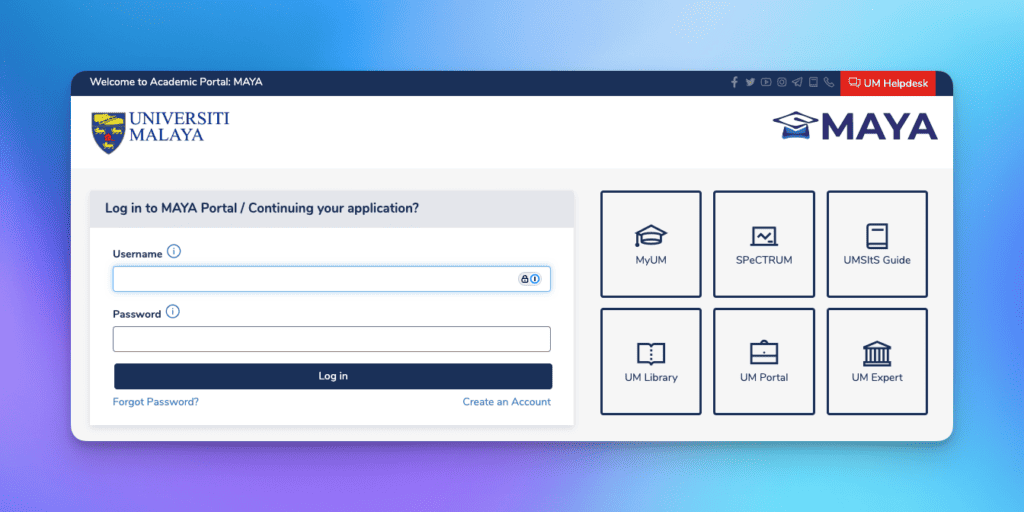
Students use MAYA UM to access academic information, register for courses, and view examination results. Staff use it to manage teaching schedules, student records, and administrative tasks.
How to Login MAYA UM?
To login to MAYA UM, go to https://maya.um.edu.my, enter your SiswaMail username and password, then click the Log In button. The link forwards you to the SITS e:Vision portal, where your dashboard loads. Students use the format SiswaMailID@siswa.um.edu.my with their SiswaMail password. UM changed this student format from @perdana.um.edu.my to @siswa.um.edu.my on 17 June 2023. Staff sign in with their UMMail credentials. Use the Forgot Password option to reset it, if you have forgotten your password.
What To Do If I Forget My MAYA UM Password?
If you forget your MAYA UM password, you can reset it by clicking the Forgot Password link on the login page. This will redirect you to a password recovery page where you will need to enter your username or email address associated with your MAYA UM account. Follow the instructions sent to your registered email to reset your password. Ensure that your new password meets the security requirements, such as a combination of uppercase and lowercase letters, numbers, and special characters. Once your password is reset, you can log in using your new credentials.
What Are the Common Issues When Logging into MAYA UM?
Common issues when logging into MAYA UM include incorrect username or password, account suspension, technical issues with the portal, browser compatibility problems, and network connectivity issues. If you enter the wrong username or password, you will not be able to log in.
Ensure that you are using the correct username format, SiswaMailID@siswa.um.edu.my for students, with your SiswaMail password. A common mistake is using the @siswa365.um.edu.my Office 365 format, which signs you into Microsoft 365 and SPeCTRUM but not MAYA. Contact the university's IT department for assistance, if your account is suspended for a guideline violation. Technical issues, such as server downtime, can also prevent you from logging in. Try accessing the portal later or use a different browser in such cases.
What Are the Features of MAYA UM?
The features of MAYA UM include centralized academic management, course registration, communication tools, resource accessibility, and administrative processing. The portal allows students to register for courses, view their academic schedules, and access exam results. It also provides a platform for communication between students, faculty, and administrative staff.
Students reach academic resources, such as lecture notes, assignments, and course materials, through the portal. MAYA UM also handles administrative processes, such as fee payments, financial aid applications, and graduation clearance. For staff, the portal offers tools for managing teaching schedules, student records, and other administrative tasks.
How Do I Register for Courses on MAYA UM?
To register for courses on MAYA UM, log in to the portal using your username and password. Once logged in, go to the Course Registration section. Here, you will find a list of available courses for the semester. Select the courses you wish to enroll in and confirm your registration.
Ensure that you complete the registration process within the specified deadline to avoid any issues. After registering, you can view your course schedule and access course materials through the portal. If you encounter any problems during the registration process, contact the university's academic department for assistance.
Can I Check My Exam Results on MAYA UM?
Yes, you can check your exam results on MAYA UM. After logging in to the portal, go to the Exam Results section. Here, you will find your final examination results for the semester. You can also download your result slips for previous semesters.
The portal lets students track their academic progress and view results at any time. Contact the university's examination department for assistance, if you find missing grades or incorrect information.
How Do I Contact MAYA UM Support?
To contact MAYA UM support, log a ticket at the UM One Stop Complaint Centre, https://helpdesk.um.edu.my, or email the IT helpdesk at helpdesk@um.edu.my. The helpdesk handles technical issues, login problems, and other portal-related inquiries, and operates Monday to Thursday 8.00am to 5.00pm and Friday during office hours. Visit the Centre for Information Technology (PTM) in person, if you are on campus and need direct help.
How Do I Keep My MAYA UM Login Details Secure?
To keep your MAYA UM login details secure, create a strong password that mixes uppercase and lowercase letters, numbers, and special characters. Never share your SiswaMail credentials with anyone. Watch for phishing emails that imitate UM and try to capture your password.
Regularly update your password to reduce the risk of unauthorized access. Use secure networks when accessing the portal, and avoid logging in from public Wi-Fi networks. If you suspect that your account has been compromised, contact the university's IT department immediately to reset your password and secure your account.
What Are the Benefits of Using MAYA UM?
The benefits of using MAYA UM include handling academic tasks from one login instead of separate offices. Students register modules, check exam schedules, and view results in the same place. Lecture notes and assignments sit a click away through the portal.
MAYA UM connects students, faculty, and administrative staff in one system, which shortens the time it takes to resolve issues. Staff manage teaching schedules and student records through the same portal.
What Are the System Requirements for Accessing MAYA UM?
The system requirements for accessing MAYA UM include a stable internet connection and a compatible web browser. The portal is accessible from most modern web browsers, such as Google Chrome, Mozilla Firefox, and Microsoft Edge. Ensure that your browser is up to date to avoid compatibility issues.
You may also need to disable pop-up blockers or enable JavaScript for certain portal features. MAYA UM opens in a mobile browser, though a desktop or laptop suits detailed tasks such as module registration better.
How Do I Access MAYA UM on Mobile Devices?
To access MAYA UM on mobile devices, open your mobile browser and go to https://maya.um.edu.my. The portal is mobile-friendly and can be accessed from most smartphones and tablets. However, some features may be optimized for desktop use, so it is recommended to use a computer for tasks that require more detailed navigation, such as course registration or exam result checking.
If you encounter any issues while accessing the portal on a mobile device, try clearing your browser cache or using a different browser.
What Should I Do If My Courses Are Missing on MAYA UM?
If your courses are missing, first confirm that you completed the Confirmation of Registration in MAYA. Missing courses usually reappear within 24 hours of that step. The courses then sync from MAYA to SPeCTRUM, the UM learning management system that holds class materials and quizzes. Click the Get Course(s) from MAYA button in SPeCTRUM to fetch them manually, if they still do not appear after 24 hours. This pulls your confirmed module list across and updates your course display. Contact the university's academic department for further assistance, if the problem continues.
How Do I Update My Personal Information on MAYA UM?
To update your personal information on MAYA UM, log in to the portal and go to the Profile or Personal Information section. Here, you can update details such as your contact information, address, and emergency contacts. Ensure that your information is accurate and up to date, as it may be used for official communication from the university. If you encounter any issues while updating your information, contact the university's administrative department for assistance.
What Are the Security Policies for MAYA UM?
The security policies for MAYA UM protect user data through encryption and secure authentication. The university requires strong passwords and asks users to update them regularly. The portal monitors for suspicious activity and can temporarily block an account when it detects unauthorized access. Report any suspected breach to the university's IT department immediately.
How Do I Access Additional Resources on MAYA UM?
To access additional resources on MAYA UM, log in to the portal and go to the Resources or Library section. Here, you will find links to academic materials, research databases, and other resources provided by the university. You can also access the UM Library website through the portal to explore a wide range of online resources, including e-books, journals, and research papers. If you need assistance with accessing specific resources, contact the university's library support team for guidance.
What Are the Academic Calendars Available on MAYA UM?
The academic calendars available on MAYA UM provide important dates and deadlines for the academic year. These include semester start and end dates, examination periods, and registration deadlines. Students can access the academic calendar through the portal to stay informed about key dates and plan their academic activities accordingly. The calendar is updated regularly to reflect any changes or updates to the academic schedule. If you have any questions about the academic calendar, contact the university's academic department for clarification.
How Do I Apply for Financial Assistance Through MAYA UM?
To apply for financial assistance through MAYA UM, log in to the portal and go to the Financial Aid or Scholarship section. Here, you will find information about available financial aid programs and application procedures. Follow the instructions provided to submit your application for financial assistance. Ensure that you meet the eligibility criteria and provide all required documentation. If you have any questions about the application process, contact the university's financial aid office for assistance.
What Are the Communication Tools Available on MAYA UM?
The communication tools available on MAYA UM include messaging systems, announcement boards, and email integration. These tools facilitate communication between students, faculty, and administrative staff. Students can use the portal to send messages to their instructors, receive important announcements, and stay informed about academic matters.
MAYA UM links to the SiswaMail email system, so students reach their official UM email accounts from the same login. Contact the university's IT department for support, if the communication tools do not work.