
To log in to myTNB, go to https://mytnb.com.my, enter your email address and password, then click Login. You can also sign in with MyDigital ID. New users click Register now. If you only need to pay a bill, use Express Payment without creating an account.
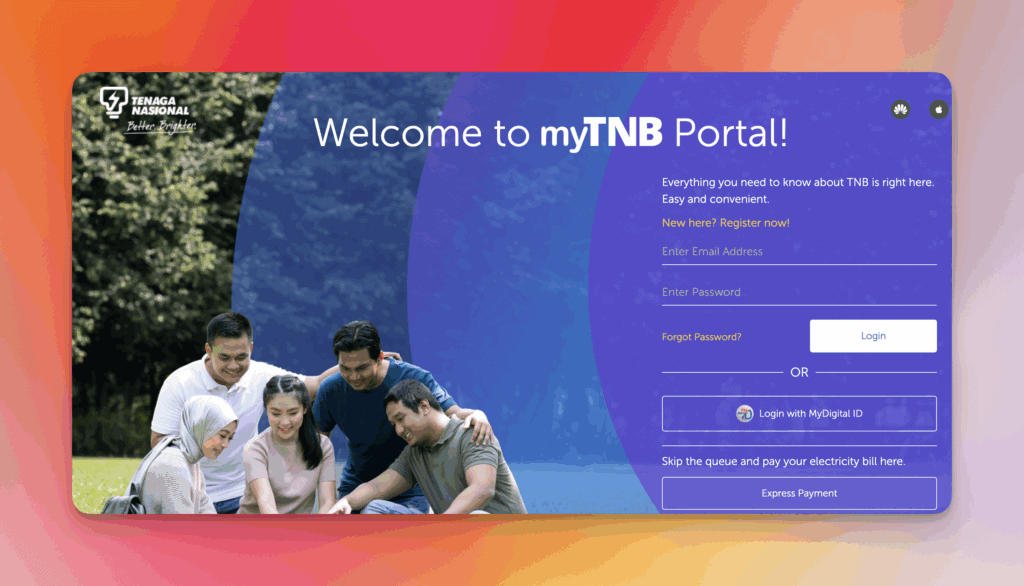
How to log in to the myTNB portal
- Open www.mytnb.com.my (or the myTNB app).
- Enter the email address you registered with.
- Enter your password (at least 8 alphanumeric characters).
- Click Login, or choose MyDigital ID if you prefer national digital identity sign-in.
- If this is your first login after registration, select whether you are an owner or non-owner, then link your 12-digit electricity account.
Forgot your password? Use Forgot Password? on the same page and follow the email reset link.
What is myTNB?
myTNB is Tenaga Nasional Berhad’s official digital platform for managing electricity accounts in Peninsular Malaysia. It is available as a website and a mobile app. Customers can view and pay bills, download statements, track usage, report outages, and apply for services such as change of tenancy or new supply.
How to register for myTNB
- Visit the myTNB registration page.
- Click Register now / New Here? Register Now!.
- Enter a valid email (this becomes your login ID), create a password, and complete verification.
- After activation, log in and add your electricity account: premise ownership type, 12-digit account number, owner identification number, and an account nickname.
Business users who manage commercial accounts should register through the myTNBiz portal instead of the residential myTNB flow.
Already using the myTNB app? You do not need a second registration. Use the same email and password on the website.
How to add more than one TNB account
One myTNB profile can hold several electricity accounts (for example two houses, or a home plus a shop):
- Log in → Manage Account → Owned / Other Account → Add Account.
- Enter the 12-digit account number and the owner details requested on screen.
- After success, every linked account appears on the dashboard.
How to download the myTNB app
Android: Google Play. iPhone: App Store. Log in with the same credentials as the portal. The app and portal offer the same core services: current bill, payment, usage charts, and account management.
Check or pay a bill without logging in
Use Express Payment: enter your 12-digit TNB account number to see the amount due and pay. Card payments without login are capped at RM250. For the full statement and history, you still need a myTNB login. Step-by-step: check TNB bill without registration and semak bil TNB 12 digit.
Where is the 12-digit TNB account number?
On the physical bill, look under No. Akaun / Account No. at the top. After login, open Information → Bill & Payments (portal) or View Bill (app). Online banking JomPAY also needs this number as Ref-1 with biller code 5454 — see TNB JomPAY biller code.
Fix myTNB login or payment problems
- Clear browser or app cache, confirm the email/password, or reinstall the app.
- Reset the password from the login page if the account is locked.
- If a payment is delayed, contact TNB so they can verify the record and avoid a disconnection notice.
TNB Careline: 1300-88-5454 (bills and account). Outage line: 15454. Official Facebook: @tnbcareline. Brand overview and related guides: TNB hub.