
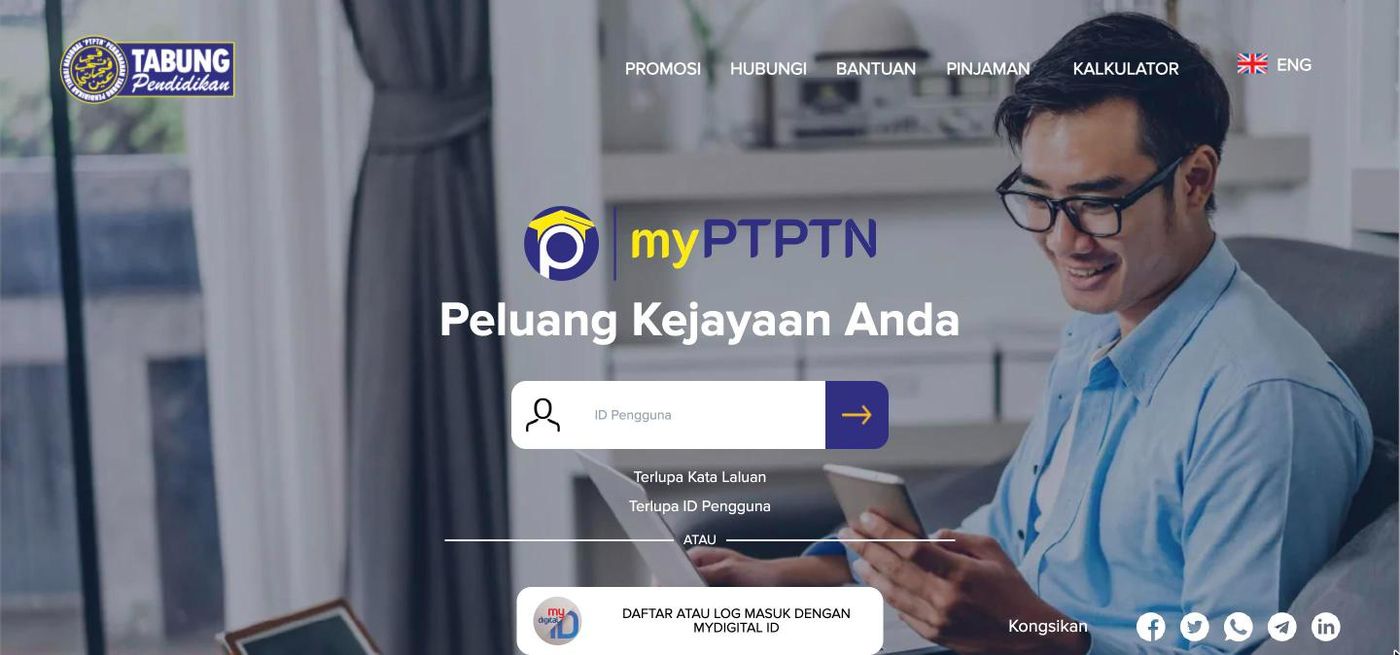
Checked 11 November 2026 against the PTPTN Official Portal (ptptn.gov.my), its FAQ and the live myPTPTN login.
To check your PTPTN loan amount, log in to myPTPTN at myptptn.ptptn.gov.my or in the myPTPTN app. The first screen after login shows your detailed loan and savings balance by year. PTPTN states that its loan statement check (Semakan Penyata Pinjaman) has moved entirely to myPTPTN, so the old "Loan Statement Check" steps on the main PTPTN website no longer describe the current process.
How to check PTPTN loan amount?
- Go to myptptn.ptptn.gov.my, or open the myPTPTN app (Google Play, App Store or Huawei AppGallery).
- Log in. Existing users can enter their ID Pengguna (user ID) and password, then the 6-digit TAC sent by SMS. You can also choose Daftar atau Log Masuk dengan MyDigital ID.
- Your loan and savings balances appear on the first screen, broken down by year.
Forgot your details? The login screen has Terlupa Kata Laluan (forgot password) and Terlupa ID Pengguna (forgot user ID) links.
New to myPTPTN? According to PTPTN's FAQ, since 15 September 2025 all new customers can only register through MyDigital ID, and they log in with MyDigital ID afterwards. Registration runs: Log Masuk/Daftar in myPTPTN, choose to register with MyDigital ID, confirm in the MyDigital ID app, then return to myPTPTN. Existing users are not required to switch, but PTPTN encourages it.
The old PTPTN Official Portal still shows statements until it closes completely, but only as a summary first; you then click "LIHAT TERPERINCI" for the full balance. PTPTN says myPTPTN is the easier view. For the same steps in Malay, see the Login PTPTN di myPTPTN guide.
How to pay PTPTN loan repayment via Direct Debit?
In myPTPTN, apply for salary deduction (potongan gaji) or direct debit (debit terus) from your account. PTPTN notes that myPTPTN lets you choose the account at the start of the application, while the old portal asked for it only after employer details were completed.
For one-off payments, myPTPTN takes loan repayments and savings deposits through Pautan Pantas (Quick Links) or the home screen, and the statement updates immediately. PTPTN also lists MyPay (online repayment on mobile web) and Razer Cash at 7-Eleven.
Note one PTPTN rule: if enforcement action is deferred, existing salary deduction, direct debit or standing instructions are not cancelled automatically. You must cancel them yourself, salary deduction and direct debit at a PTPTN counter and a standing instruction at your bank, and payments already received are not refunded.
How to apply for PTPTN loan repayment deferment?
PTPTN offers two kinds of relief for borrowers who struggle to repay. Both are covered in the PTPTN FAQ, so check the current conditions there or with PTPTN before applying.
Applying for PTPTN deferment
PTPTN's FAQ has a section on repayment deferment for borrowers who are unemployed or continuing their studies. Eligibility, supporting documents and the application channel are set by PTPTN and can change, so confirm them in the FAQ or by calling 03-2193 3000 before you submit anything.
Applying for rescheduling or restructuring of PTPTN repayments
Rescheduling and restructuring change your Repayment Schedule (Jadual Bayaran Balik, JBB) so the monthly instalment better matches what you can pay. PTPTN's FAQ notes, for example, that after a 6-month deferment of enforcement action ends, Ujrah loans are restructured automatically. Ask PTPTN which option fits your loan type (Ujrah or conventional).
How to contact PTPTN?
- Phone: 03-2193 3000
- Online complaints: eaduan.ptptn.gov.my
- Email: aduan@ptptn.gov.my
Never share your myPTPTN password, MyDigital ID credentials or TAC with anyone who contacts you.